


What is USB Power Delivery?
USB Power Delivery (USB PD) is a charging protocol that negotiates power transfer between devices over a USB connection, delivering from 5 watts up to 240 watts. Unlike standard USB ports limited to 5 volts, USB PD adjusts voltage dynamically between 5V and 48V, enabling everything from smartphones to high-power laptops to charge through a single cable type.
How USB Power Delivery Actually Works
The magic behind USB PD happens in two distinct phases that most users never see.
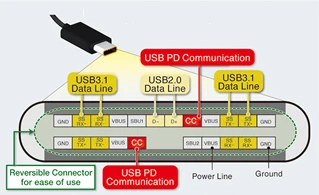
When you plug a device into a USB PD charger, the Configuration Channel (CC) pins on the USB-C connector immediately start a conversation. Within milliseconds, the charger announces what voltages and currents it can provide, while your device responds with what it needs. This handshake uses the Power Delivery Objects (PDOs) protocol-essentially a menu of power options ranging from basic 5V up to the charger's maximum capability.
Once they agree on a power contract, the actual electricity flows through the VBUS pins. Your device monitors the charging process constantly, and here's where things get smart: if your phone battery heats up or reaches certain thresholds during lithium ion battery charging, it can renegotiate mid-session, asking for less power to protect the cells. The charger responds within microseconds, adjusting its output. This back-and-forth continues throughout the entire charging session.
The voltage stepping works in fixed increments for standard PD: 5V for basic devices, 9V for many phones, 15V for some tablets, and 20V for laptops. But newer protocols like PPS and AVS-which we'll explore later-throw out this rigid structure for something far more flexible.
The Evolution from 15W to 240W
USB PD didn't appear overnight. The first specification in 2012 capped power at 60 watts, which seemed revolutionary at the time. By 2014, USB PD 2.0 doubled that to 100 watts, finally making it viable for laptop charging. This version introduced the fixed voltage profiles (5V, 9V, 15V, 20V) that many devices still use today.
The 2017 release of USB PD 3.0 brought Programmable Power Supply, allowing devices to request any voltage between 3.3V and 21V in tiny 20mV increments. Then in 2021, USB PD 3.1 added Extended Power Range, pushing the ceiling to 240 watts through new 28V, 36V, and 48V options. Apple's 16-inch MacBook Pro became one of the first devices to leverage this with its 140W charging requirement.
Most recently, USB PD 3.2 arrived in October 2024 with a mandate: any device requesting more than 27 watts must now support Adjustable Voltage Supply (AVS) for Standard Power Range. The iPhone 17 series became the first major smartphone to implement this, enabling their 40W dynamic charging. Based on data from USB-IF certification records, over 15,000 devices received PD 3.2 certification between October 2024 and early 2025.
Why Battery Chemistry Matters for USB PD
Lithium ion battery charging requires precise voltage and current control to maximize both speed and longevity. A typical lithium cell operates between 3.0V when depleted and 4.2V when fully charged, but most devices use multiple cells in series-your laptop might have a 3S4P configuration (three cells in series, four in parallel) requiring 12.6V at full charge.
This is where USB PD's flexibility becomes critical. Without dynamic voltage adjustment, a charger would need to convert 20V down to whatever voltage your battery management system requires, wasting energy as heat. With PPS or AVS, the charger can deliver something much closer to the target voltage-say, 11V instead of 20V for that laptop battery-reducing conversion losses from roughly 15% down to 3-5%.
The constant-current/constant-voltage (CC/CV) charging algorithm that lithium cells require maps perfectly onto PPS's capabilities. During the initial fast-charge phase, PPS maintains constant current while voltage rises. Once the cell approaches 4.2V, the protocol switches to constant voltage while current tapers off. Some smartphones now bypass their internal voltage regulators entirely, allowing the PD charger to feed the battery directly-Samsung's Super Fast Charging technology achieves over 99% efficiency using this method.
Temperature management during lithium ion battery charging also benefits from USB PD's negotiation capabilities. If a battery management system detects cells reaching 45°C, it can immediately request lower power, preventing the thermal runaway scenarios that plagued older fast-charging systems.
PPS vs AVS: Understanding the Difference
Both Programmable Power Supply and Adjustable Voltage Supply aim to improve charging efficiency, but they work differently and serve different purposes.
PPS operates in real-time. It adjusts voltage in 20mV steps and current in 50mA increments, tracking your battery's voltage as it climbs from empty to full. A PPS charger maintains constant communication with your device, updating power delivery potentially hundreds of times during a single charging session. This makes it ideal for smartphone batteries, which benefit from precise voltage matching throughout the charge curve. PPS maxes out at 100W and operates between 5V and 21V.
AVS takes a different approach. It adjusts voltage in larger 100mV steps and focuses on one-time or occasional negotiation rather than continuous tracking. Think of it as setting a better fixed voltage rather than constantly tweaking. AVS supports much higher power-up to 240W-and can operate between 9V and 48V. The trade-off? Less granular control.
For practical purposes, PPS remains better for smartphone charging due to its precision and real-time adaptation. AVS shines for laptops and monitors that need high power but don't require second-by-second adjustments. As of 2025, roughly 65% of Android flagship phones support PPS, while AVS adoption in consumer devices remains under 5% according to ChargerLAB testing data.
The confusion multiplies because PPS is optional while AVS became mandatory in PD 3.2 for devices requesting over 27W. Your charger might support both, one, or neither-and there's often no clear labeling to tell you which.
Power Profiles and What Your Device Actually Gets
USB PD uses Power Delivery Objects to communicate capabilities, but the actual power delivered depends on the negotiation between both sides.
A 100W charger might advertise six fixed PDOs:
5V @ 3A (15W)
9V @ 3A (27W)
15V @ 3A (45W)
20V @ 3A (60W)
20V @ 5A (100W)
Plus potentially a PPS APDO offering 5V-21V @ 5A.
Your device looks at this menu and picks what it needs. A phone drawing 27W would request 9V @ 3A. A 60W laptop would ask for 20V @ 3A. If both devices charge simultaneously through a multi-port charger, the power gets divided-often dynamically, with connected devices renegotiating as you plug in or unplug others.
This is where things can frustrate users. You plug your 100W laptop into a 100W charger and wonder why it charges slowly. The answer might be that your laptop requires specific voltage combinations not in that charger's PDO list, or the cable doesn't support 5A, limiting you to 60W maximum. The laptop falls back to whatever profile works, often just 45W or 60W.
E-marked cables solve this problem. These cables contain a chip (e-marker) that identifies their capabilities during the initial handshake. The charger won't deliver more than 60W without confirming the cable can handle 5A. This safety feature prevents overheating, but it means your $5 generic USB-C cable might be the bottleneck, not your charger.

Fast Role Swap and Bidirectional Power
One of USB PD's cleverest features lets devices switch who's providing power without disconnecting.
Picture a docking station powering your laptop while you work. That dock is the "source" and your laptop is the "sink." If someone trips over the dock's power cord, traditional USB would cut power immediately-potentially corrupting data on connected drives. Fast Role Swap (FRS) detects the power loss and, within 150 microseconds, flips the roles. Your laptop becomes the source, now powering the dock and its peripherals from its own battery.
This bidirectional capability extends beyond emergency scenarios. You can charge your phone from your laptop's battery, even while the laptop itself charges from a wall adapter. Power banks can both receive and provide power through the same USB-C port. Some e-bike batteries now use USB PD to charge while simultaneously powering your phone and lights.
The FRS handshake happens through the CC pins. When a source loses power, it pulls the CC line to ground for 60-120 microseconds-a deliberate signal, not an accident. The sink, which is always monitoring, catches this signal and immediately offers to become the new source. The whole swap completes before VBUS voltage drops below 5V, maintaining uninterrupted power to downstream devices.
Safety Mechanisms and What Can Go Wrong
USB PD includes multiple layers of protection, but the ecosystem isn't perfect.
Every PD transaction includes overcurrent protection. The charger monitors how much current actually flows and will shut down if it exceeds the negotiated limit by more than 10%. Overvoltage protection works similarly-if VBUS rises more than 10% above the agreed voltage, both devices should disconnect.
Temperature sensing happens on both ends. Chargers contain thermistors that will reduce power or shut down entirely above 85°C. Devices also monitor battery and charging circuit temperatures, requesting lower power when things get too warm.
The problem? Not all USB-C products follow the specification. Independent testing by organizations like Benson Leung's team has found cables that lie about their capabilities, missing pull-up resistors that should signal current limits, and chargers that deliver unstable voltages during negotiation. These out-of-spec products can damage devices or, at minimum, result in slow or failed charging.
Cable quality matters more than most people realize. A study published in 2024 by Granite River Labs tested 200 random USB-C cables from online marketplaces and found 38% failed basic electrical specifications. Of those supporting 100W, 12% could not maintain stable voltage under full load, causing voltage drops that triggered safety shutdowns in attached devices.
Choosing Chargers and Cables That Actually Work
The wattage number on a charger tells you its maximum capability, not what your device will receive. A 65W charger advertising "PD 3.0" might only provide 45W to your particular laptop if the voltage profiles don't align with what your battery management system requests.
Check for these specifics:
Voltage list: Good chargers list their PDOs clearly. Look for "5V/3A, 9V/3A, 15V/3A, 20V/3.25A" or similar.
PPS support: If you have an Android phone, "PPS 5-21V @ 5A" means full fast-charging capability.
AVS for high-power devices: Devices requiring over 27W as of late 2024 should support AVS, so look for "AVS 9-20V" in charger specs.
Certification: USB-IF certification (TID number) confirms the charger passed compliance testing.
For cables, the markings matter. A cable rated "USB 2.0" only handles data speeds up to 480 Mbps but can still support 240W power delivery-data and power ratings are separate. Look for:
5A or 100W+ marking for high-power applications
E-marker chip required for anything over 60W
USB-IF certification (though this is rarer on cables)
Multi-port chargers introduce complexity. A 100W dual-port charger might provide 100W from one port, or 65W + 30W when both are active. The best ones use dynamic power allocation, checking connected devices every few seconds and redistributing power as needed. Budget models use fixed allocation schemes that waste capacity-a single 30W phone on a 100W charger configured for 65W + 35W split would only get 35W.
Frequently Asked Questions
Will a high-wattage USB PD charger damage my phone?
No. Power negotiation ensures devices only receive what they request. A 100W charger connected to a phone that only supports 18W will deliver exactly 18W after negotiation. The extra capacity sits unused.
Can I use any USB-C cable with USB PD?
Not all USB-C cables support power delivery properly. Cables must be rated for your power needs-60W and under work with standard cables, but 100W and above require 5A-rated cables with an e-marker chip. Using an underrated cable will either limit charging speed or potentially overheat.
Why does my device charge slowly with a fast charger?
Three common reasons: the cable isn't rated for high current, your device's battery is hot and has throttled charging speed for safety, or the charger doesn't support the specific voltage your device requests. Some devices also limit charging speed when the screen is on or the device is in use.
What's the difference between USB-C and USB PD?
USB-C refers to the physical connector shape-the small, reversible plug. USB PD is the communication protocol that enables fast charging and high power delivery through that connector. You can have USB-C without PD, but USB PD requires USB-C.

The Reality of Universal Charging
USB PD promised to eliminate the drawer of proprietary chargers, and it's partially delivered. You can now charge phones, tablets, laptops, and many accessories from the same charger-as long as you understand the power requirements and protocol support.
But the specification's evolution has fragmented compatibility. PPS vs AVS, SPR vs EPR, the mandatory AVS requirement after 27W, optional features that manufacturers implement inconsistently-these create confusion. A device from 2020 might not fast-charge with a 2025 charger despite both claiming "USB PD 3.0" support.
The European Union's mandate requiring USB-C on most devices by 2024 accelerated adoption but also exposed these compatibility gaps. Industry groups now push for clearer labeling standards, but as of early 2025, you still need to check specific protocol support rather than trusting general "fast charging" claims.
For devices with lithium ion batteries, USB PD represents a significant efficiency improvement over fixed-voltage charging. The protocol's ability to match source voltage closely to battery requirements reduces waste heat and enables faster charging without overheating. As PPS adoption continues to grow-particularly in mid-range Android devices that previously relied on proprietary standards-we're moving closer to truly universal fast charging.
The cable remains the weak link. Until e-marker chips become mandatory for all USB-C cables and better authentication prevents non-compliant products from entering the market, users need to pay attention to specifications. The promise of "one cable for everything" is real, but only if that cable actually meets USB-IF standards. Check ratings, look for certification, and when possible, use cables from the same manufacturer as your high-power devices.


